TheGrint | Golf Handicap & GPS
- 4.5
- Rating
- 1.00M
- Installs
- Free
- Price

 Analysis by App-foxy
I tend to judge a golf app by what happens between the first tee and the final score, not by how impressive its feature list sounds. TheGrint is built for that stretch of the round: finding a course, using GPS information, recording shots or scores, checking statistics, and keeping an official handicap in the same place. I found it most useful when I treated it as a round companion rather than as a complete replacement for every golf tool I might use.
Developed by Grint LLC, this free sports app is aimed at golfers who want more structure than a paper scorecard but less complexity than a dedicated launch monitor or specialist statistics system. It is available for Android and iOS, carries an Everyone age rating, and includes optional in-app purchases ranging from $0.99 to $197.99 per item. That price range matters: the basic entry point is easy, but anyone considering paid features should look carefully at what is included before committing.
Its public reception is strong, with a 4.7 average from around 5.3 thousand ratings and roughly 1.2 thousand written reviews. The app has passed 1 million installs, which fits my impression that it is designed for ordinary golfers as much as for serious competitors. I would recommend trying it if you regularly play different courses and want your handicap and round history close at hand. I would be more cautious if you expect every function to remain equally useful when your connection is weak.
You May Also Like

 Blood Strike: 2.5 Anniversary
Blood Strike’s Loadouts Turn Every Drop Into a Tactical Gamble
A close look at Blood Strike’s custom loadouts: how fast access to signature weapons reshapes its battle royale rhythm, rewards preparation, and narrows the gap between fights.

 Pandora - Music & Podcasts
Pandora’s Music Is Easy to Start, but Harder to Recover
Pandora’s strength is its low-effort path from a seed to a station. Its weak spot is how much confidence it asks you to place in connection, setup, and quiet recovery.

 8 Ball Pool
 Is Built on Rivalries, Rematches, and Routine
A close look at the rivalries, rematches, shared routines, and unanswered safety questions that turn a quick pool match into a persistent mobile community.

 Samsung Music
’s Quiet Strength Is Playing What You Already Own
Its reach comes less from spectacle than from dependable access to a personal library. That simplicity is both the app’s strongest retention engine and its ceiling.

 AccuWeather: Weather Radar
AccuWeather Review: A Quick, Clear Forecast for Everyday Decisions
For everyday plans, the best forecast is the one you can understand quickly. AccuWeather makes rain timing, radar, and local conditions easy to act on, with a few trade-offs.

 Hill Climb Racing
Why Hill Climb Racing Still Turns Crashes Into One More Run
A tiny car, a bumpy hill and one more upgrade: Hill Climb Racing keeps resurfacing because its simple chaos makes every near-miss feel personal.
More From Our News Desk



How connectivity changes a round with TheGrint
I’ve found that connectivity matters most in the moments around a shot, not just when loading a course: it affects how smoothly I can move from checking information to keeping the round going. I’ll look at how I prepare for those handoffs, what I do when a response is slow, and how to keep the final score dependable without letting the phone take over the game.
Before the first tee, the connection does the quiet work
The network matters most before I start playing. Course discovery and GPS-related information depend on the app being able to obtain the right course details, and that makes the preparation stage more important than it first appears. When I have a reliable connection, I can get the round organized before walking to the opening tee instead of trying to solve everything while other players are waiting.
My practical advice is to open the app while you still have time and confirm that the intended course is the one selected. This is especially useful when a club has more than one layout or when a nearby course has a similar name. A few seconds spent checking the course and scorecard context can prevent a much more annoying correction later.
The large course directory is one of the app’s strongest ideas. TheGrint promotes GPS access for more than 40 thousand courses, so it is clearly aimed at golfers who travel, play public courses, or join friends at unfamiliar venues. That breadth is more valuable to me than a polished interface alone because it reduces the need to switch between a course website, a handicap service, and a separate scorekeeping app.
There is also a subtle trade-off here. A broad course database is only helpful if I select the correct course and tee information before the round becomes busy. If I rush through setup, the app can still be useful, but the quality of the record depends on the choices I make at the beginning. I would not wait until the first tee to download, install, sign in, and configure everything at once.
On the course, GPS is helpful but not magic
Once I am playing, the GPS function is most useful as a quick reference. It can reduce the need to estimate distances visually, particularly on a course I have never played. I like having that information alongside score tracking because it keeps the round in one workflow instead of forcing me to move between a rangefinder, a scorecard, and a statistics app.
Still, I would not treat the phone display as an unquestionable authority. GPS information is a guide, not a substitute for reading the lie, judging wind, checking elevation with my eyes, or using a trusted physical rangefinder when precision is critical. On a familiar course, I may use it mainly for confirmation. On an unfamiliar course, I use it to build a picture of the hole before choosing a club.
The connection can shape how quickly this feels. If the app needs to refresh course information or map content, a weak signal can make the experience feel less immediate. I have learned to avoid unnecessary browsing during the round and to prepare the relevant course screen in advance. That does not turn the app into an offline tool, and I would not assume that every GPS or course function works without connectivity. It simply makes the connected experience less fragile.
For a casual weekend round, that distinction may not matter. For a competition-style round or a long day at a remote course, it matters a lot. I would keep a backup method for distances and scoring rather than allowing the phone to become the only record of what happened.
Score entry is simple, but discipline makes the record useful
The scorekeeping side is where I think the app earns its place. Entering a score as I go is less work than reconstructing the round from memory, and the later statistics become much more meaningful when the information is recorded consistently. The key is not entering every possible detail; it is choosing a routine I can maintain.
I prefer to update the score after finishing each hole, when the result is still clear. If the group is moving quickly, I make a short note mentally and enter it at the next natural pause rather than stopping in the middle of the fairway. The app is most effective when it stays out of the way of the round instead of making the round feel like data collection.
This is one of the less obvious strengths of combining scoring with handicap information. A score is not just an isolated number in a notebook. It becomes part of a longer record that can help me notice whether poor results come from a particular type of hole, inconsistent putting, or simply a difficult day. The value appears over repeated rounds, not after one afternoon.
There is a corresponding weakness: detailed tracking can make a relaxed round feel administrative. If I am playing socially and want to focus entirely on conversation, I may prefer a simple scorecard and enter the result later. TheGrint suits golfers who want a living record, but not everyone wants to monitor performance every time they play.
The watch app changes the phone habit
The watch app is an important part of the experience for anyone who dislikes taking a phone out after every hole. It can make the round feel less interrupted because the information is closer to my wrist. That is particularly useful when the phone is in a pocket or bag and I want to check something quickly without handling it.
I would not choose the app solely because of the watch component, though. The watch is most valuable when it supports a workflow I already like: prepare the round on the phone, use the watch for quick access, and return to the phone for deeper review. Expecting the smaller screen to replace the full mobile experience would be unrealistic.
There is also a practical connectivity question. A watch-based experience still depends on the relationship between the devices and the services involved, so I would test the setup before relying on it during an important round. A short trial at a familiar course is enough to discover whether notifications, screen visibility, and score entry feel comfortable for me.
What happens when the signal becomes unreliable
The most important limitation is not that a connection can be imperfect; every GPS golf app faces that reality. The issue is how much of my round depends on the app responding at the exact moment I need it. In a strong-signal area, the experience feels convenient. In a patchy area, waiting, refreshing, or wondering whether a tap registered can undermine that convenience.
I handle this by separating preparation from live use. Before leaving the clubhouse or home, I select the course, check the round setup, and make sure my phone has enough battery for the day. I also carry a physical scorecard. That is not an indictment of the app; it is sensible backup for any phone-based scoring system.
If a score entry appears delayed, I avoid tapping repeatedly. I make a quick written note of the hole and return to the app when it responds. Duplicate entries are more troublesome than a short delay because they can make the final record harder to trust. A calm recovery routine is more useful than assuming the app will always behave instantly.
At the end of the round, I review the complete score before treating it as final. This is where I catch forgotten holes, accidental taps, or a score entered under the wrong course context. I would rather spend a minute checking the round while the details are fresh than discover a mistake later when looking at handicap information.
Using data without turning golf into a spreadsheet
The statistics are appealing because they promise a clearer view of my game, but they only become useful when I define what I am trying to learn. I would not record everything simply because the app makes it possible. Instead, I might focus on one question for several rounds: am I losing more shots through poor starts, missed short putts, or trouble on long holes?
This approach keeps the app from becoming a burden. A golfer who enters inconsistent information may get a detailed-looking history that does not actually support good decisions. Consistency matters more than volume. If I change my tracking habits every round, comparisons become less reliable and the statistics can create false confidence.
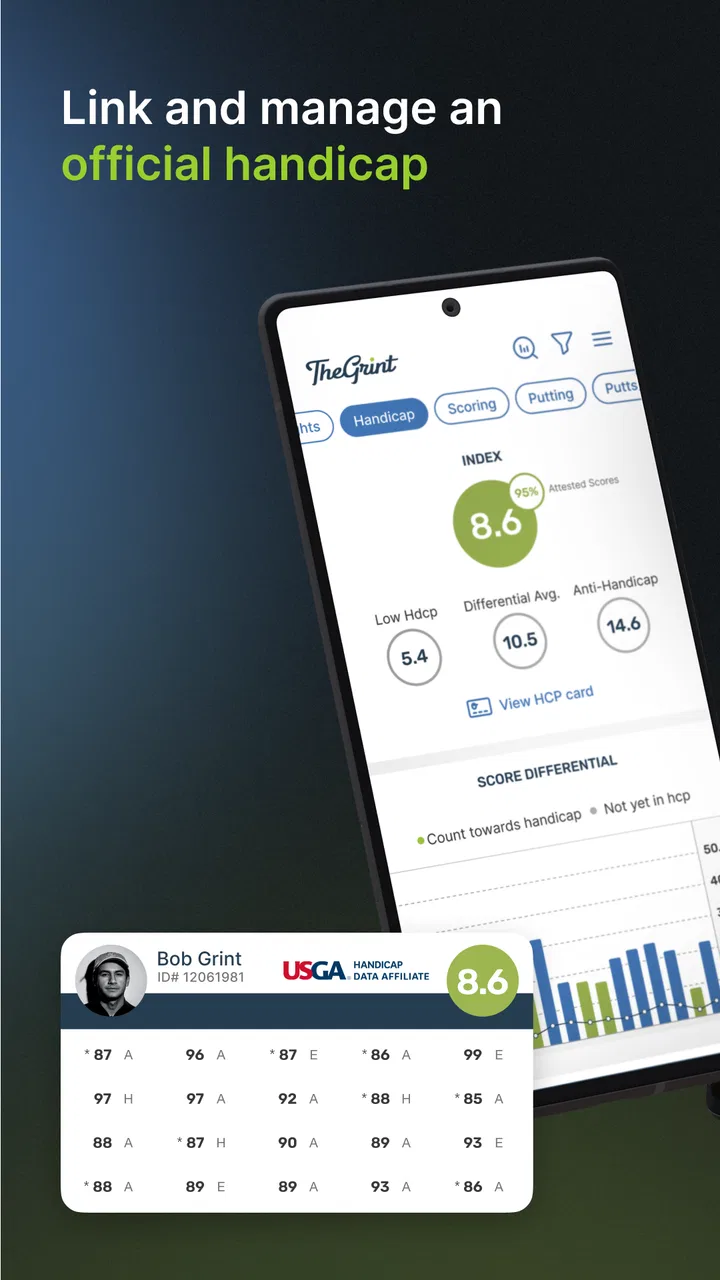
The official handicap feature is another reason to keep scores organized. For golfers who play with different groups or want a recognized measure that develops over time, having handicap information connected to the round record is more convenient than maintaining separate accounts or spreadsheets. I still view the handicap as a summary of performance, not a complete explanation of my game.
That distinction is important. A handicap will not tell me why I struggled on a windy day, whether my club selection was sensible, or how much a difficult lie affected a hole. The app can help organize the evidence, but I still need to interpret it. I use the statistics to choose what to practice, not to let a number dictate every decision on the course.
For data-conscious users, I recommend limiting background activity where the phone allows it and avoiding unnecessary app switching during play. I would also review battery use before a long round, particularly when GPS and a watch are both involved. The goal is not to eliminate every connection; it is to reserve the phone’s resources for the features that actually help me play.
Everyday scenarios where it earns its place
Imagine I am invited to play a course I have never visited. Before leaving, I use the app to locate the course and set up the round. In the car park, I confirm the layout and tee selection while the connection is dependable. During play, I check GPS information when a hole is unfamiliar, enter the score after each hole, and use the watch for quick access when possible. Afterward, I review the score and keep the round with my handicap history.
That scenario shows the app at its best: it reduces the number of separate tasks without demanding that I become a full-time statistician. It is also a good example of why preparation matters. If I wait until the signal is poor, the first tee is crowded, and my battery is low, the same app can feel much less polished.
Another strong use case is the golfer who plays regularly but has never kept reliable records. The app gives that player a reason to make scoring habitual. Over time, the handicap and statistics can provide more useful feedback than a collection of vague memories about recent rounds. The benefit comes from continuity, not from a single clever feature.
I am less convinced it is the right choice for someone who only wants a basic digital scorecard and never looks at past performance. That golfer may find the GPS, handicap, statistics, and watch ecosystem more than necessary. A simpler scoring tool can be faster and less distracting if all that matters is recording the final number.
Where it differs from the usual alternatives
Compared with a paper scorecard, TheGrint offers a much richer record and can connect scoring with handicap and statistics. Paper still wins for reliability, battery life, and simplicity. I would carry paper as a fallback even when using the app, especially on courses where the connection is unpredictable.
Compared with a dedicated GPS device or rangefinder, the phone app is more flexible and can combine distance guidance with score history. A dedicated device may be better for golfers who want a purpose-built screen, minimal notifications, and less dependence on a phone. TheGrint is the better fit for someone who values an all-in-one record more than a single-purpose instrument.
Compared with a basic handicap calculator, it offers a broader playing workflow because the score, course context, GPS use, and statistics sit closer together. The trade-off is that a broader app can feel busier. I would choose it when I want to understand my rounds, not merely produce one handicap number.
The watch app also separates it from many simple scorekeeping alternatives, but only for golfers who already enjoy wearable access. If I do not use a compatible watch regularly, that feature has little practical value and should not influence my decision.
Who should use it, and who should skip it
I think TheGrint is a strong match for regular golfers, travelers, club players, and anyone trying to turn scattered rounds into a consistent history. It is especially appealing if I want GPS course support, official handicap tracking, and statistics without maintaining several unrelated systems.
I would suggest caution for golfers with limited mobile data, unreliable coverage at their usual courses, or very old phones. The app’s connected features are central to its appeal, so the surrounding mobile experience matters. I would also skip it if I know I will resent entering scores or checking statistics after every round.
The free price makes experimentation straightforward, but I would not assume that every advanced capability is included simply because the app can be installed without payment. Since individual in-app purchases can range from $0.99 to $197.99, I would read each upgrade screen carefully and decide whether the feature solves a problem I actually have.
My verdict on the connected golf experience
After using it as a course companion, I see TheGrint as a practical bridge between a paper scorecard and a collection of specialist golf devices. Its strongest combination is the link between course discovery, GPS assistance, score tracking, handicap information, statistics, and watch access. That combination can make a normal round easier to organize and a season easier to understand.
Its main weakness is also clear: the more I rely on live mobile features, the more I need to prepare for weak connectivity, battery limits, and delayed responses. I would not build my entire round around the assumption that the phone will always be available. A backup scorecard and sensible preparation remove most of the risk without taking away the app’s convenience.
My recommendation is to try it if you want your golf history to become useful rather than merely stored. Use the connection before the round, keep live interaction brief, review entries afterward, and treat the statistics as guidance instead of judgment. For golfers who want a connected, repeatable way to manage rounds and handicap information, it is a convincing free starting point. For golfers who want absolute simplicity or zero dependence on a phone, a paper card, dedicated GPS device, or simpler handicap tool may be the better companion.
FAQs for TheGrint | Golf Handicap & GPS
01What features does TheGrint offer to enhance my golfing experience?
TheGrint provides a comprehensive suite of features for golfers, including a GPS rangefinder, a digital scorecard, and a golf handicap tracker. Additionally, it offers a detailed statistics module and social features that allow you to connect with friends and other golfers. The app also integrates with the USGA GHIN system, ensuring your handicap is official.
02Is TheGrint free to use, or are there any premium features available?
TheGrint offers both a free version and a premium subscription. The free version includes basic features such as score tracking and social connections. Premium features, available through a subscription, offer advanced GPS functionalities, detailed statistics, and the ability to track scores for multiple players. Users can choose based on their needs and budget.
03How accurate is the GPS rangefinder in TheGrint?
TheGrint’s GPS rangefinder is highly accurate, providing distances to the front, back, and center of the green, as well as hazards. Users have reported high satisfaction with its precision, which is comparable to standalone GPS devices. However, accuracy can vary depending on the quality of your smartphone's GPS signal and settings.
04Can I use TheGrint to connect with other golfers and track their scores?
Yes, TheGrint includes social features that allow you to connect with friends and other golfers. You can view their scores, track their progress, and even create leaderboards for friendly competitions. This social aspect makes TheGrint not just a tool for tracking your own game but also for engaging with the golfing community.
05Does TheGrint integrate with official golf handicap systems?
TheGrint integrates seamlessly with the USGA GHIN system, allowing users to maintain an official golf handicap. This integration ensures that your handicap is recognized by clubs and tournaments that adhere to the USGA standards. Users simply need to connect their GHIN number to TheGrint for automatic updates.
Pros
- Accurate GPS for precise distance measurements.
- Comprehensive handicap tracking feature.
- User-friendly interface with easy navigation.
- Integrates with popular golf courses worldwide.
- Detailed performance stats and analysis.
Cons
- Requires a stable internet connection.
- Subscription needed for premium features.
- Initial setup can be time-consuming.
- Some users report occasional GPS glitches.
- Limited offline functionality.

TheGrint | Golf Handicap & GPS
Gallery